This page is in your language because of where you are visiting from. View in English
Free & open source · BSD-3-Clause · v2.1.0
Sound in.Text out.Your audio stays on your computer.
Whisper Transcriber Suite runs OpenAI's Whisper model entirely on your own computer — via faster-whisper, whisper.cpp or NVIDIA Parakeet. Drag in audio or video and get a timed transcript back. No cloud, no account, no per-minute cost.
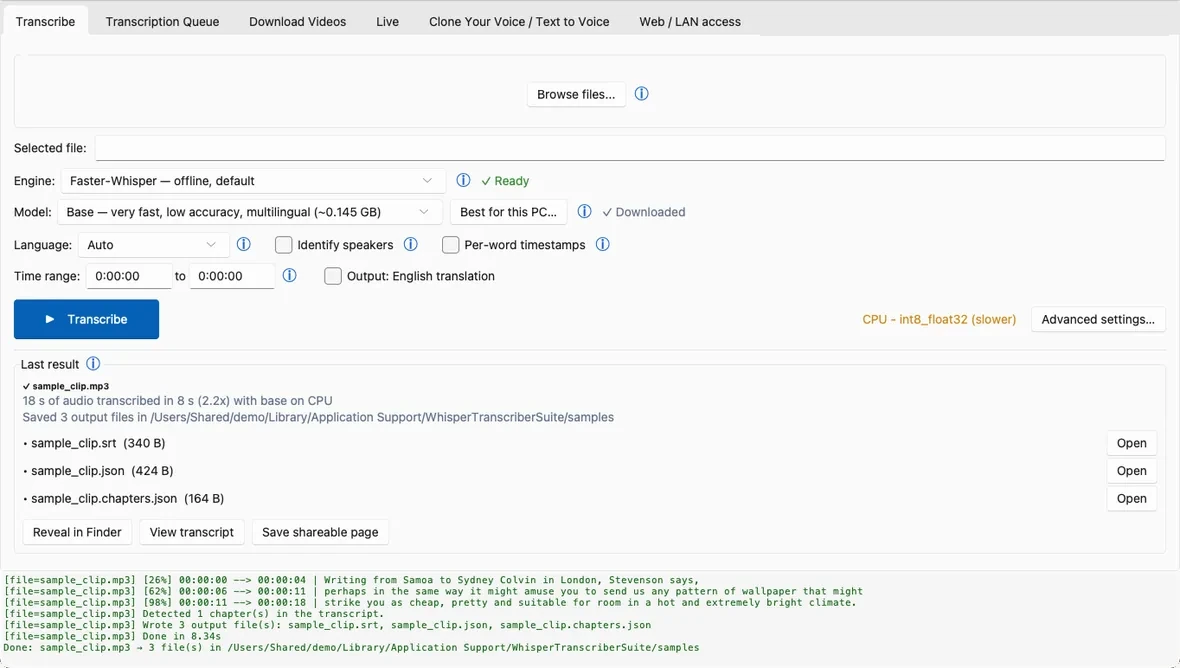
Drop a file, pick your options, press Transcribe. Everything else — the queue, downloads, live capture, voice cloning and LAN sharing — sits one tab away. Drag the ring, or use the arrows.
Transcribe
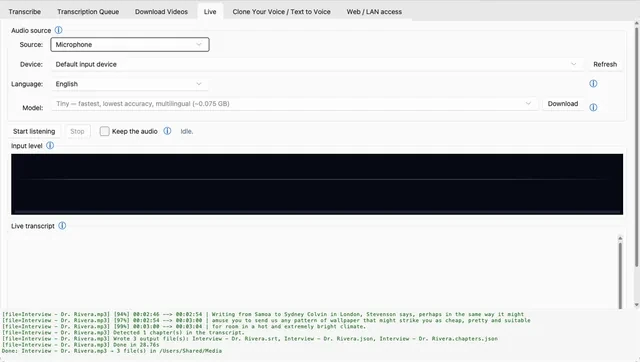
Live
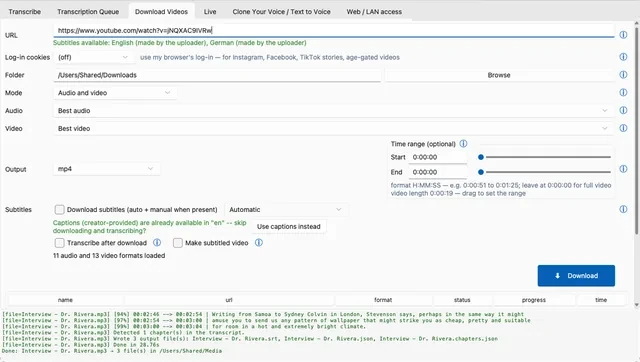
Download Videos
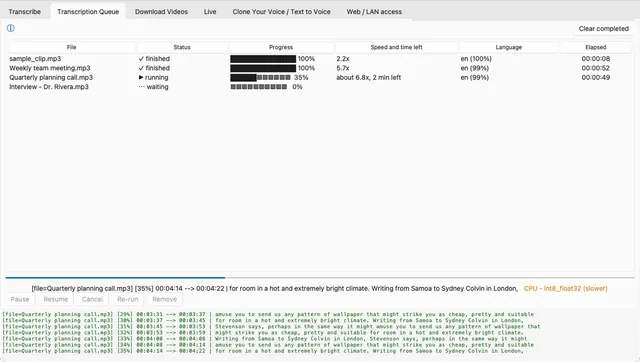
Transcription Queue
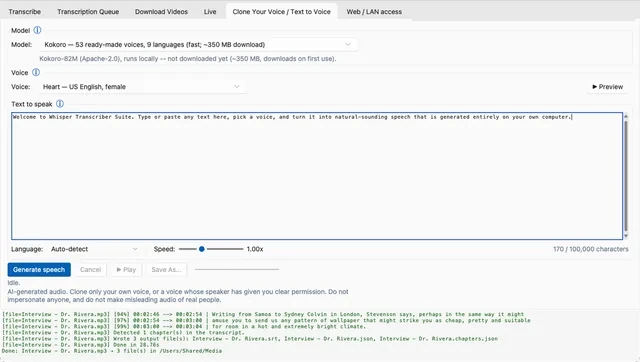
Clone Your Voice
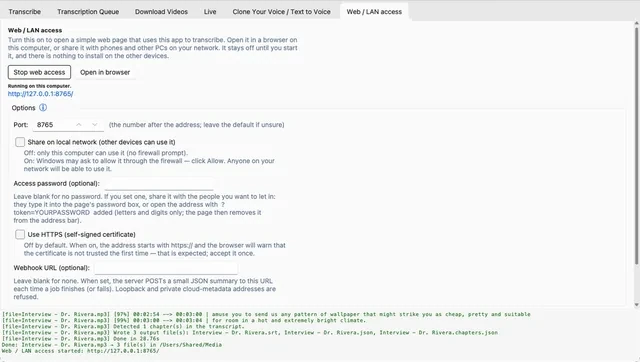
Web / LAN access
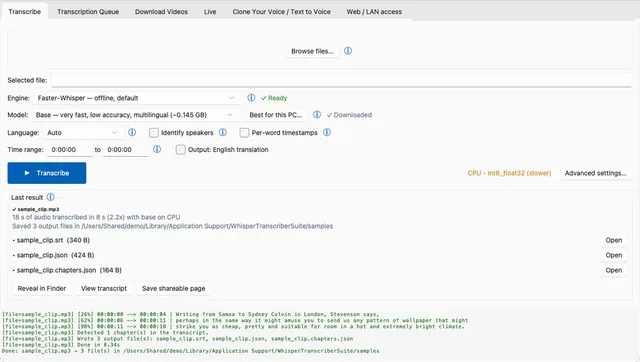
Transcribe
A drop target, engine, model and language pickers, speaker-label and per-word timestamp options.
New in 2.1
What's new in 2.1. Now in your language.
The app in 42 languages, speaker labels that reach the end of long recordings, files that survive a power cut, and online features that work on every Mac. Below them, what 2.0 added.
2.1 · All platforms
The app in your language
Menus, buttons and messages come in 42 languages (39 on macOS and Linux). The app follows your system language, or you pick one in Advanced settings. Every language except English is a machine translation and is marked as one; Persian, Arabic and Hebrew are offered on Windows for now.
2.1 · All platforms
Speaker labels you can trust
Speaker names now reach the end of long recordings, speaker detection can no longer crash a transcription, and next to Identify speakers you can set how many people talk (2 to 10) instead of leaving it on Auto.
2.1 · All platforms
Your work is safer
Transcripts, exports and subtitles are fully written to disk before they replace the old file, so a power cut cannot leave an empty file. A transcription whose worker stopped after writing all its files counts as finished.
2.1 · macOS
Online features on every Mac
The update check, problem reports and other web lookups no longer fail with certificate verify failed.
2.0 · All platforms
Speed and time left
The Transcription Queue tab shows how fast each transcription runs and roughly how long is left, for example about 4.8x, 6 min left. The result card reports the speed, the model and the device when the job is done.
2.0 · All platforms
Make subtitled video
Tick it on the Download Videos tab and a link becomes <title>-subbed.mp4 with the subtitles burned in: download, transcribe and burn in as one queued job with progress and a working Cancel. The download and the transcript are kept.
2.0 · All platforms
Share a transcript as one web page
Save a finished transcript as a single .html file that opens in any browser with no install and no internet connection: timestamps, speakers, chapters and a search box. Click a word and the media plays from there.
2.0 · All platforms
Work offline, made visible
One switch under File keeps the app off the network. A line at the bottom of the window says whether a connection is open, and Verify offline now shows test connections being refused. Usage statistics are on by default and can be turned off under Help.
2.0 · All platforms
Translate speech to English
An Output: English translation option turns non-English speech into English subtitles in one pass, using Whisper's own translate task. It is off by default and not available for every engine or model.
2.0 · macOS
A Mac that feels like a Mac
An app menu with Settings (Command-comma), Light and Dark that follow macOS, the system font, files opened from Finder or dropped on the Dock icon, and a notification when a job finishes while the app is in the background.
2.0 · Windows
Taskbar progress and dark title bars
The taskbar button shows progress, a count of queued and running jobs, and flashes when a job finishes. Title bars follow the Dark theme, and text stays sharp at 125% and 150% display scaling.
2.0 · First launch
A quick start and a sample clip
A new install asks for your language, Fast or Best quality, and a folder, and shows the model size before anything downloads. An 18-second public-domain clip lets you see a real transcript before you pick a file of your own.
Also new in 2.0: Text to Voice reads texts up to 100,000 characters piece by piece, an Update it button refreshes the video downloader without administrator rights, and a quiet update bar replaces the update dialog. The Video Tiling tab is gone. Everything is in the changelog.
Features
Everything you'd want from a transcription tool. Running on your machine.
faster-whisper · whisper.cpp · Parakeet
Local, private transcription
Whisper large-v3 by default, plus large-v3-turbo and distil-large-v3.5. Pick the backend that fits your hardware.
faster-whisperdefault
whisper.cpplocal
NVIDIA Parakeetlocal
Runs offline after the one-time model download
14 formats
Every transcript format you'll need
Written right next to your input file — plus oTranscribe, ELAN, InqScribe and Express Scribe for professional transcript workflows.
Transcribes a microphone — or whatever this machine is playing — as it happens. Cuts are made at natural pauses so words are never split.
so the words appear as you speak
Per-word timestamps
Speaker diarisation
Optional "Identify speakers" pass, plus per-word timestamps and time-range clipping for editing precise segments.
00:04.2Speaker 1Sowheredowestart?
00:06.9Speaker 2Withtherecordingitself.
Pause · resume · re-run
Batch queue
Live status for every pending and running job, with full control over each row always one click away.
interview-03.mp4done
lecture-week-2.m4arunning
podcast-ep-41.wavqueued
yt-dlp powered
Video & audio downloads
Anything yt-dlp handles, with optional transcribe-on-finish. Downloads resume rather than restart.
https://…/watch?v=…
DownloadTranscribe.srt
Measures before it filters
Adaptive denoise
Measures each recording first and only cleans it when that helps — checks its own output and reverts if it removed speech.
beforeafter
Plus AI tools (summaries, action items, a bilingual SRT pass), an optional offline voice-cloning tab, and a local-network mode — more in the README.
How it works
Runs on your computer. Your audio stays there.
Transcription runs on your own computer. Your audio is uploaded only if you switch on one of the two optional cloud engines, and transcript text leaves only if you connect a remote AI model yourself.
01
Drop a file, or paste a link
Audio or video from disk, or anything yt-dlp can fetch. The Tk interface runs in the main process and queues the job instantly.
02
A worker holds the model
Every job runs in its own long-lived worker subprocess that keeps Whisper in memory and streams progress back over newline-delimited JSON — so the window never freezes.
03
The transcript lands next to your file
A per-worker token and a heartbeat keep the routing robust and let the app detect a stuck worker instead of hanging with it.
Everything needed is bundled — a private Python runtime, ffmpeg, ffprobe and yt-dlp. Only the speech model itself downloads later (about 1–3 GB, once); after that, transcription works without an internet connection.
Windows Recommended for you
Installer .exe
~238 MB
Most people — normal installer, Start-menu shortcut, upgrades in place. The app isn't code-signed, so Windows SmartScreen may warn once: More info → Run anyway.
Downloads the right build for your Mac (Apple Silicon on macOS 14+, otherwise Intel via Rosetta), copies the app into Applications and opens it. Files fetched by curl aren't quarantined, so there's no "unidentified developer" warning to click past.
Prefer the usual way? Open the .dmg and drag the app into Applications; the first launch then needs right-click → Open (macOS 14 and older) or System Settings → Privacy & Security → Open Anyway (macOS 15+).
Whisper Transcriber Suite is one of several free, open-source desktop apps that transcribe on your own computer. Here is how it compares with Subtitle Edit, Vibe and Buzz, including when another app fits better. Read the full comparison, with a source for every fact and two more apps, noScribe and aTrain.
Checked 2026-10-05 against each project's own README, docs and releases. Apps change quickly: see the full comparison for sources.
Feature
Whisper Transcriber Suite
Subtitle Edit
Vibe
Buzz
Price, licence
Free, BSD-3-Clause
Free, MIT
Free, MIT
Free, MIT
Downloads
Windows installer and portable ZIP, macOS (Apple silicon, Intel); Linux from source
Windows (x64, ARM64), macOS, Linux (Flatpak, tar.gz)
Windows, macOS, Linux (.deb, .rpm)
Windows, macOS (1.4.5 is the last for Intel Macs), Linux (Flatpak, Snap, AppImage), PyPI
GPU acceleration
NVIDIA (CUDA)
NVIDIA (CUDA), Vulkan
NVIDIA, AMD, Intel (Vulkan / CoreML)
NVIDIA (CUDA), Apple silicon, Vulkan
Signed Windows installer
No
Not stated
Yes, per its docs
No
Interface languages
42 (machine-translated)
35
22
16
Choose it if
You also want a live microphone, video downloads, 14 output formats and a local-network mode with an OpenAI-compatible route
You want many speech engines (Parakeet, Canary, Qwen3-ASR and more) or a notarized Mac app
You want a Windows installer its docs say is signed, or GPU support that names AMD and Intel
You want Linux packages (Flatpak, Snap, AppImage) or a PyPI install
Yes. It's BSD-3-Clause licensed, with no subscription and no per-minute cost. The Whisper model itself downloads once (about 1-3 GB) on first launch; after that, transcription works without an internet connection.
Does it upload my audio or video anywhere?
No, not by default. Every default backend — faster-whisper, whisper.cpp, NVIDIA Parakeet — runs locally on your machine. Two backends are opt-in only (a cloud Gemini-API backend, and Google Cloud Speech-to-Text), and both stay off until you enable them yourself in Advanced → Backend. Usage statistics (no audio, no file names) are on by default and can be turned off under Help → Usage statistics, the app checks GitHub once a day for a new version, and File → Work offline stops all network use.
What platforms does it run on?
Windows, macOS and Linux. Published downloads are a Windows installer, a Windows portable ZIP, and a macOS DMG; Linux runs from source.
What transcript formats can it produce?
srtvttasstsvtxtjsonlrcmddocxpdf, plus oTranscribe, ELAN, InqScribe and Express Scribe.
Can it label who is speaking?
Yes — optional speaker diarisation ("Identify speakers"), with per-word timestamps and time-range clipping.
Can it transcribe a live microphone or system audio?
Yes, from the Live tab — a microphone or the system audio, transcribed as it happens.
Can it download and transcribe online videos, e.g. from YouTube?
Yes, any site yt-dlp supports, with an optional transcribe-on-finish step.
Can it summarize a transcript, pull out action items, or answer questions about it?
Yes, via the optional AI Tools tab in the transcript viewer — summarize, action items, ask-a-question, and a per-segment translate pass that writes a bilingual .srt. It's off by default.
Can it clone a voice and make it say new text?
Yes, via the optional Clone Your Voice tab, using OmniVoice (Apache-2.0) entirely on your machine. Off by default; opt in at install time, and you must confirm you have permission to clone the reference voice.
How is this different from calling the Whisper API directly?
It runs the model locally via faster-whisper by default, so there's no per-minute API cost and no audio leaves your machine — unless you explicitly opt into one of the two cloud backends.
Can several people on the same network use it without installing it on every machine?
Yes — Web/LAN access mode turns this machine into a transcription page the other devices on the network can use.
What is new in version 2.1?
Menus, buttons and messages come in 42 languages (machine-translated and marked as such); speaker labels reach the end of long recordings and you can set how many people talk; transcripts, exports and subtitles are fully written to disk before they replace the old file; online features work on every Mac. Version 2.0 added the queue's speed and time left, subtitled video from a link, transcripts as one offline web page, a checkable Work offline mode and translation to English. See What's new in 2.1 and the changelog.
Can it turn a video link into a video with subtitles?
Yes. On the Download Videos tab, tick Make subtitled video: the app downloads the video, transcribes it with Whisper and burns the subtitles in with ffmpeg, producing a file named after the video with -subbed.mp4. The download and the transcript are kept, and an existing -subbed.mp4 is never replaced.
Can I keep the app off the network completely?
Yes. File → Work offline stops the update check, usage statistics, model downloads and remote AI providers. While it is on, a line at the bottom of the window says whether a connection is open, and Verify offline now shows test connections being refused. With it off, the app contacts the network only for its online settings at startup, the daily update check, usage statistics (which can be turned off under Help → Usage statistics) and downloads you start.
How do I contact the project?
Bugs and feature requests go to GitHub Issues, questions to Discussions, and anything else by email (the address is shown on request in the Contact section). Security reports go through GitHub's private vulnerability reporting.
Contact & support
Talk to us. Help it grow.
Email
Press, partnerships, or anything that isn't a bug report.
Whisper Transcriber Suite is free and BSD-3-Clause licensed, maintained in the open. If it saved you time, a star on GitHub helps others find it — and a coffee is always appreciated.